Callym Lukie | Level Designer
Balls of Steel
Balls of Steel is a third-person, rock paper scissor based single-player 1v1 action game where the players participate in a Ball kicking tournament to have “true Balls of Steel”. Bust opponents’ balls using various attacks, outwit your opponents moves to prove you are worthy to have true Balls of Steel!
Gamejam Theme
Make Me Laugh
Gameplay Video
View the team and
download the game here!
My Contributions
Game Design
I was a main part of the game design team coming up with the initial concepts and style of the game.
Following the 'Make Me Laugh' theme we decided on a rock paper scissors fighting game about hitting the other person in the balls.
I was a part of the Design Documentation where we gathered references, wrote a high concept, and planned out the various game events in one accessible spot. Due to the accelerated timeframe, the team opted to document the essential gameplay elements and quickly get started on creating.
High Concept + Setting

Gameplay + Level

In the documentation we planned for edge cases like if the player doesn't select an ability, set an amount of lives for the game end, and created an 'mash' event that triggers when the player and AI select the same ability. This means you must spam a button more than the AI in order to win the engagement.
Blue Printing Camera Controls
I was responsible for all the camera work you see inside gameplay. Setting events, positioning, zooming in and out, setting balanced screen shake, and toggling slow-mo at the proper time.

Binding events connected to the player, and gameplay to certain functions for code to be executed. These events trigger at certain game states and toggle certain camera locomotion.
The duel event was a big moment in Balls of Steel. It was you vs the AI in a spam battle.
I wanted to capture that uncontrollable button mashing by adding camera shake, and a focused zoom in on both characters in their big moment.


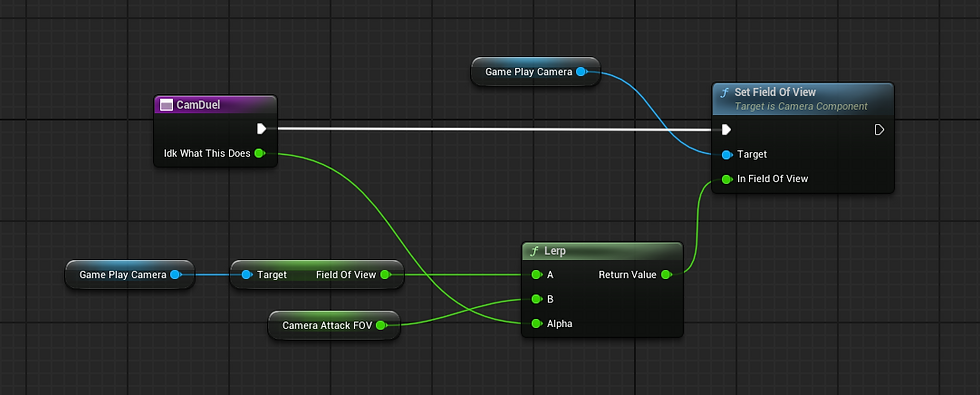
The function that sets the field of view to the desired position.


Camera work for when the AI, or player takes damage.
-
The timelines ensure the zoom is gradual, but also impactful.
-
The camera position changes when the event is called, and reverts to its natural overview after the event nears its end.

When the player, or AI loses the match the camera goes into another unique state. This initiates slow-mo so our losing animation plays with impact, and the final winning blow has a lot of impact.